
A Telegram bot to make adding transactions to YNAB easier
Posted on 2022/07/22 by Dirk van der Laarse
We use the popular budgeting tool YNAB, and like to follow their 4 Rules.
They do support Direct Import from Banks, but like many US-based companies, they only focus on the US Market
We also bank with Investec, one of the few local banks offering Programmable Banking, in other words, an API. They also allow you to run snippets of Javascript before and after card transactions.
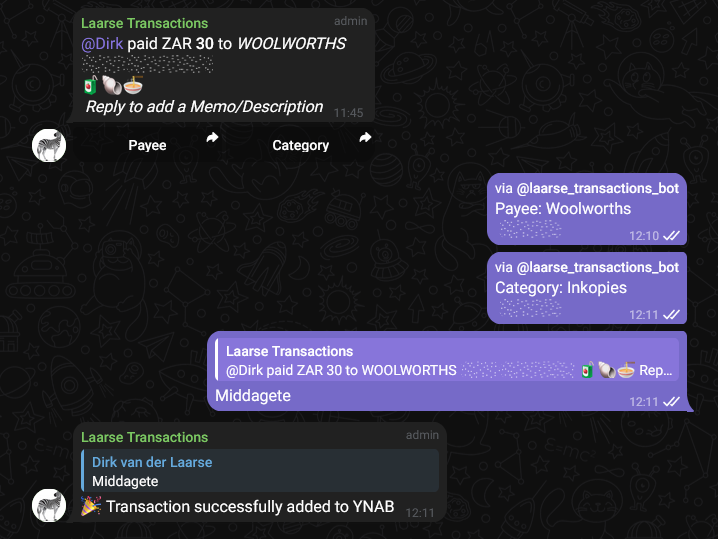
Let's build a Telegram bot that sends a message in our Family Telegram group chat once a card transaction is made! We can make the message interactive, to allow anyone to:
- Choose the Payee
- Categorise the transaction
- Add a memo/description
The amount and date can be parsed automatically - no more amount typo's to fix at the end of the month when we do reconciliation in YNAB!
Here are some helpful links:
- Example scripts for python-telegram-bot
- set /setinlinefeedback in @BotFather
- Heroku CLI steps
- Heroku Procfile settings
- Helpful Telegram API docs
Investec Programmable Banking
The first step is to create a proof-of-concept script.
Create main.js on Investec Programmable banking:
const TransactionResult = {
Declined: 0,
Success: 1,
Reversed: 2
}
// We use a combination of three emojis to identify transactions, and keep their replies linked.
const getRandomEmoji = (cat, sub) => {
const emojis = {
'Animals & Nature': {
'animal-mammal':['🐵','🐒','🦍','🦧','🐶','🐕','🦮','🐕🦺','🐩','🐺','🦊','🦝','🐱','🐈','🦁','🐯','🐅','🐆','🐴','🐎','🦄','🦓','🦌','🦬','🐮','🐂','🐃','🐄','🐷','🐖','🐗','🐽','🐏','🐑','🐐','🐪','🐫','🦙','🦒','🐘','🦣','🦏','🦛','🐭','🐁','🐀','🐹','🐰','🐇','🐿','🦫','🦔','🦇','🐻','🐻❄️','🐨','🐼','🦥','🦦','🦨','🦘','🦡','🐾'],
'animal-bird':['🦃','🐔','🐓','🐣','🐤','🐥','🐦','🐧','🕊','🦅','🦆','🦢','🦉','🦤','🪶','🦩','🦚','🦜'],
'animal-amphibian':['🐸'],
'animal-reptile':['🐊','🐢','🦎','🐍','🐲','🐉','🦕','🦖'],
'animal-marine':['🐳','🐋','🐬','🦭','🐟','🐠','🐡','🦈','🐙','🐚'],
'animal-bug':['🐌','🦋','🐛','🐜','🐝','🪲','🐞','🦗','🪳','🕷','🕸','🦂','🦟','🪰','🪱','🦠'],
'plant-flower':['💐','🌸','💮','🏵','🌹','🥀','🌺','🌻','🌼','🌷'],
'plant-other':['🌱','🪴','🌲','🌳','🌴','🌵','🌾','🌿','☘','🍀','🍁','🍂','🍃',]
},
'Food & Drink': {
'food-fruit':['🍇','🍈','🍉','🍊','🍋','🍌','🍍','🥭','🍎','🍏','🍐','🍑','🍒','🍓','🫐','🥝','🍅','🫒','🥥'],
'food-vegetable':['🥑','🍆','🥔','🥕','🌽','🌶','🫑','🥒','🥬','🥦','🧄','🧅','🍄','🥜','🌰'],
'food-prepared':['🍞','🥐','🥖','🫓','🥨','🥯','🥞','🧇','🧀','🍖','🍗','🥩','🥓','🍔','🍟','🍕','🌭','🥪','🌮','🌯','🫔','🥙','🧆','🥚','🍳','🥘','🍲','🫕','🥣','🥗','🍿','🧈','🧂','🥫'],
'food-asian':['🍱','🍘','🍙','🍚','🍛','🍜','🍝','🍠','🍢','🍣','🍤','🍥','🥮','🍡','🥟','🥠','🥡'],
'food-marine':['🦀','🦞','🦐','🦑','🦪'],
'food-sweet':['🍦','🍧','🍨','🍩','🍪','🎂','🍰','🧁','🥧','🍫','🍬','🍭','🍮','🍯'],
'drink':['🍼','🥛','☕','🫖','🍵','🍶','🍾','🍷','🍸','🍹','🍺','🍻','🥂','🥃','🥤','🧋','🧃','🧉','🧊'],
'dishware':['🥢','🍽','🍴','🥄','🔪','🏺']
}
}
const random = (array) => array[~~(Math.random() * array.length)]
if(!emojis[cat])
cat = random(Object.keys(emojis))
if(!emojis[cat][sub])
sub = random(Object.keys(emojis[cat]))
return random(emojis[cat][sub])
}
async function notifyOnTelegram(authorization, event) {
const telegramURL = `https://api.telegram.org/bot${process.env.telegramBotToken}/sendMessage`;
const uppercaseCurrency = authorization.currencyCode.toUpperCase();
const transactionId = getRandomEmoji() + getRandomEmoji() + getRandomEmoji()
const userText = "[@<Card User Here>](tg://user?id=123456789)"
let amount = investec.helpers.format.decimal(authorization.centsAmount / 100, 100);
amount = amount.replace(".", "\\.");
let messageBody;
switch(event) {
case TransactionResult.Declined:
messageBody =
[
`${userText}, your transaction was declined: `,
`${uppercaseCurrency} *${amount}* `,
`to _${authorization.merchant.name}_ `,
`\n||_\\(${authorization.reference}\\)_||`
].join('')
break;
case TransactionResult.Success:
messageBody =
[
`${userText} `,
`paid ${uppercaseCurrency} *${amount}* `,
`to _${authorization.merchant.name}_ `,
`\n||_\\(${authorization.reference}\\)_||`,
`\n${transactionId}`,
`\n _Reply to add a Memo/Description_`
].join('')
break;
case TransactionResult.Reversed:
messageBody =
[
`${userText}, your transaction `,
`has been reversed: ${uppercaseCurrency} *${amount}* `,
`to _${authorization.merchant.name}_ `,
`\n||_\\(${authorization.reference}\\)_||`
].join('')
break;
default:
messageBody = `${userText} Unkown Error`;
}
const raw = JSON.stringify({
"chat_id": process.env.telegramGroupChatID,
"text": messageBody,
"parse_mode": "MarkdownV2",
"disable_notification": false,
"reply_markup":
{
"inline_keyboard": [
[
{
"text": "Payee",
"switch_inline_query_current_chat": `Payee (${transactionId}):`
},
{
"text": "Category",
"switch_inline_query_current_chat": `Category (${transactionId}):`
}
]
]
}
});
const requestOptions = {
method: 'POST',
headers: { 'Content-Type': 'application/json' },
body: raw,
redirect: 'follow'
};
const response = await fetch(telegramURL, requestOptions);
};
// This function runs before a transaction.
const beforeTransaction = async (authorization) => {
console.log(authorization);
return true // Authorise the transaction
};
// This function runs after a transaction was successful.
const afterTransaction = async (transaction) => {
await notifyOnTelegram(transaction, TransactionResult.Success);
console.log(transaction);
};
// This function runs after a transaction has been declined.
const afterDecline = async (transaction) => {
await notifyOnTelegram(transaction, TransactionResult.Declined);
console.log(transaction);
};
// This function runs after a transaction has been reversed.
const afterReversal = async (transaction) => {
await notifyOnTelegram(transaction, TransactionResult.Reversed);
console.log(transaction);
};
Create an env.json on Investec Programmable banking:
{
    "telegramGroupChatID": "-12312313",
    "telegramBotToken": "123:ABC-DEF"
}
Deploy the Telegram bot on Fly.io
See the code repository here: github.com/dvdl16/ynab_data_getter
Required environment variables
# YNAB
APP_YNAB_API_TOKEN = FGHIJK
APP_YNAB_BUDGET_ID = 8cd98e2b-ecf6-46d7-ac63-b597687213f4
APP_YNAB_ACCOUNT_ID = 224b38b5-d5e6-4d18-97eb-ea09ebae19c4
APP_UPTIME_HEARTBEAT_URL = https://kuma.app.somewhere/api/push/1a2b3c4d5e

# Telegram
APP_TELEGRAM_BOT_TOKEN = 12345:ABCDE
Create the app on Fly.io
In the root folder with main.py execute:
flyctl apps create telegram-bot
Set required secrets
Set the required environment variables as Fly.io secrets
flyctl secrets set -a telegram-bot APP_YNAB_API_TOKEN="[APP_YNAB_API_TOKEN here]"
flyctl secrets set -a telegram-bot APP_YNAB_BUDGET_ID="[APP_YNAB_BUDGET_ID here]"
flyctl secrets set -a telegram-bot APP_YNAB_ACCOUNT_ID="[APP_YNAB_ACCOUNT_ID here]"
flyctl secrets set -a telegram-bot APP_TELEGRAM_BOT_TOKEN="[APP_TELEGRAM_BOT_TOKEN here]"
flyctl secrets set -a telegram-bot APP_UPTIME_HEARTBEAT_URL="[APP_UPTIME_HEARTBEAT_URL here]"
Verify Fly.io configuration file
Then we can create an fly.io configuration file. See fly.toml for more details.
Deploy application
After all this actions you shall be able to deploy your application with next command:
flyctl deploy
This command will automatically build and deploy your docker container with telegram bot, and after that it will launch it in cloud.
Final result
To Do's
- Change code quality from POC
- Automatically parse Payee from message
- Add ability to add a new Payee
- Send party gif for all incoming transactions
- Add deployment pipeline for Programmable Card code on Investec